Quickstart: CryoLens
Estimated time to complete: 15 minutes
Learning Goals
By the end of this quickstart you will be able to:
- Generate a 3D reconstruction of a structure from a synthetic tomogram
- Evaluate sample quality from particles exported with the Try CryoLens tool
Prerequisites
python>=3.11,<3.13- T4 GPU or better
Introduction
CryoLens is a pre-trained generative deep learning model designed for real-time structural feedback in cryo-electron tomography (cryoET) workflows. Built on a variational autoencoder architecture with a segmented Gaussian splat decoder, CryoLens generates interpretable 3D density reconstructions from individual particle subtomograms without requiring prior alignment or averaging. The model was trained on 5.8 million synthetic particles spanning 103 protein structures.
For this quickstart, we will demonstrate CryoLens capabilities through three complementary workflows:
- Basic inference: Load a sample particle from the validation dataset and visualize its 3D reconstruction.
- Interactive web demo: Use the "Try CryoLens" web interface on the CZ CryoET Data Portal to interactively explore particle picks.
- Quality assessment: Analyze exported particle embeddings to identify outliers and assess pick consistency.
The inputs needed for this quickstart are:
- Trained model with example structures
- Candidate particle from the Try CryoLens demo
Setup
Follow Google Colab setup instructions. At the time of publication, Colab defaults to Python 3.12. For more advanced usage and application to your own data see the latest features and documentation links on the Github repository
Installation
First, install the model using pip. You will be asked to restart the runtime during the installation. Do that, and rerun this installation (a second time) to complete the install.
# Install repository with pip
!pip install "plotly>=6.1.1" nbformat kaleido -q
!pip install "git+https://github.com/czi-ai/cryolens.git"
Run Model Inference
This example uses samples extracted from the CryoLens validation set which are provided by the CryoLens Python package.
In this example you can select one of 3 samples of the following structures:
'1g3i', '1n9g', '1ss8', '1ul1', '2dfs', '2r9r', '2rhs', '2vz9', '2ww2'
and visualize CryoLens' 3D reconstruction of the given structure.
import numpy as np
import matplotlib.pyplot as plt
import h5py
from cryolens.utils.checkpoint_loading import load_vae_model
from cryolens.inference.pipeline import InferencePipeline
import torch
from importlib import resources
import cryolens.data

# Configuration
H5_FILENAME = "example_particles_validation001.h5"
STRUCTURE = "1g3i"
CHECKPOINT_PATH = "v001"
PARTICLE_IDX = 0

# Setup device
device = torch.device("cuda" if torch.cuda.is_available() else "cpu")
print(f"Using device: {device}")

# Load model
print("\nLoading model...")
model, config = load_vae_model(CHECKPOINT_PATH, device=device, load_config=True, strict_loading=False)
model.eval()
print("Model loaded successfully")

# Create pipeline
pipeline = InferencePipeline(model=model, device=device, normalization_method=config.get('normalization', 'z-score'))

# Get path to H5 file from installed package
print(f"\nLoading {STRUCTURE} particle from package data...")
try:
    # Python 3.9+ style
    with resources.files(cryolens.data).joinpath(H5_FILENAME) as h5_path:
        h5_file_path = str(h5_path)
except AttributeError:
    # Python 3.7-3.8 fallback
    with resources.path(cryolens.data, H5_FILENAME) as h5_path:
        h5_file_path = str(h5_path)

print(f"Found data file at: {h5_file_path}")

# Load data from H5 file
with h5py.File(h5_file_path, 'r') as f:
    if STRUCTURE not in f:
        raise ValueError(f"Structure {STRUCTURE} not found. Available: {list(f.keys())}")

    input_volume = f[STRUCTURE]['particles'][PARTICLE_IDX]
    print(f"Input volume shape: {input_volume.shape}")
    print(f"Metadata: {dict(f[STRUCTURE].attrs)}")

# Process through model
print("\nGenerating reconstruction...")
result = pipeline.process_volume(
    input_volume,
    return_embeddings=True,
    return_reconstruction=True,
    use_identity_pose=True
)

reconstruction = result['reconstruction']
print(f"Reconstruction shape: {reconstruction.shape}")

# Visualize orthoviews
def show_orthoviews(volume, title):
    """Display orthogonal slices through volume center"""
    fig, axes = plt.subplots(1, 3, figsize=(15, 5))
    center = np.array(volume.shape) // 2

    # XY slice (Z center)
    axes[0].imshow(volume[center[0], :, :], cmap='gray')
    axes[0].set_title(f'{title} - XY (Z={center[0]})')
    axes[0].axis('off')

    # XZ slice (Y center)
    axes[1].imshow(volume[:, center[1], :], cmap='gray')
    axes[1].set_title(f'{title} - XZ (Y={center[1]})')
    axes[1].axis('off')

    # YZ slice (X center)
    axes[2].imshow(volume[:, :, center[2]], cmap='gray')
    axes[2].set_title(f'{title} - YZ (X={center[2]})')
    axes[2].axis('off')

    plt.tight_layout()
    return fig

# Show input
print("\nDisplaying input orthoviews...")
fig_input = show_orthoviews(input_volume, "Input")
plt.show()

# Show reconstruction
print("Displaying reconstruction orthoviews...")
fig_recon = show_orthoviews(reconstruction, "Reconstruction")
plt.show()

print(f"\nLatent embedding shape: {result['embeddings'].shape}")
print("Demo complete!")Output:
Using device: cpu
Loading model...
Using version 'v001': CryoLens v0.1 production model ]8;id=836665;file:///usr/local/lib/python3.12/dist-packages/cryolens/utils/checkpoint_loading.py\checkpoint_loading.py]8;;\:]8;id=479290;file:///usr/local/lib/python3.12/dist-packages/cryolens/utils/checkpoint_loading.py#114\114]8;;\
Downloading file 'cryolens_v001.pt' from 'https://czi-cryolens.s3-us-west-2.amazonaws.com/weights/cryolens_v001.pt' to '/root/.cache/cryolens'.
Cached at: /root/.cache/cryolens/cryolens_v001.pt ]8;id=867885;file:///usr/local/lib/python3.12/dist-packages/cryolens/utils/checkpoint_loading.py\checkpoint_loading.py]8;;\:]8;id=184202;file:///usr/local/lib/python3.12/dist-packages/cryolens/utils/checkpoint_loading.py#127\127]8;;\
Removing 1 coordinate/renderer buffers for compatibility ]8;id=705659;file:///usr/local/lib/python3.12/dist-packages/cryolens/utils/checkpoint_loading.py\checkpoint_loading.py]8;;\:]8;id=806908;file:///usr/local/lib/python3.12/dist-packages/cryolens/utils/checkpoint_loading.py#553\553]8;;\
Using training params from registry for version v001 ]8;id=32996;file:///usr/local/lib/python3.12/dist-packages/cryolens/utils/checkpoint_loading.py\checkpoint_loading.py]8;;\:]8;id=171696;file:///usr/local/lib/python3.12/dist-packages/cryolens/utils/checkpoint_loading.py#579\579]8;;\
Inferred from checkpoint: num_splats=1536, latent_ratio=0.799 ]8;id=402387;file:///usr/local/lib/python3.12/dist-packages/cryolens/utils/checkpoint_loading.py\checkpoint_loading.py]8;;\:]8;id=965190;file:///usr/local/lib/python3.12/dist-packages/cryolens/utils/checkpoint_loading.py#416\416]8;;\
Model loaded successfully from /root/.cache/cryolens/cryolens_v001.pt ]8;id=111759;file:///usr/local/lib/python3.12/dist-packages/cryolens/utils/checkpoint_loading.py\checkpoint_loading.py]8;;\:]8;id=768269;file:///usr/local/lib/python3.12/dist-packages/cryolens/utils/checkpoint_loading.py#670\670]8;;\
Model loaded successfully
Loading 1g3i particle from package data...
Found data file at: /usr/local/lib/python3.12/dist-packages/cryolens/data/example_particles_validation001.h5
Input volume shape: (48, 48, 48)
Metadata: {'n_samples': np.int64(3), 'shape': '(3, 48, 48, 48)', 'snr': np.float64(5.0), 'structure': '1g3i'}
Generating reconstruction...
/tmp/ipython-input-2138184867.py:33: DeprecationWarning: pathlib.Path.__enter__() is deprecated and scheduled for removal in Python 3.13; Path objects as a context manager is a no-op
with resources.files(cryolens.data).joinpath(H5_FILENAME) as h5_path:
Reconstruction shape: (48, 48, 48)
Displaying input orthoviews...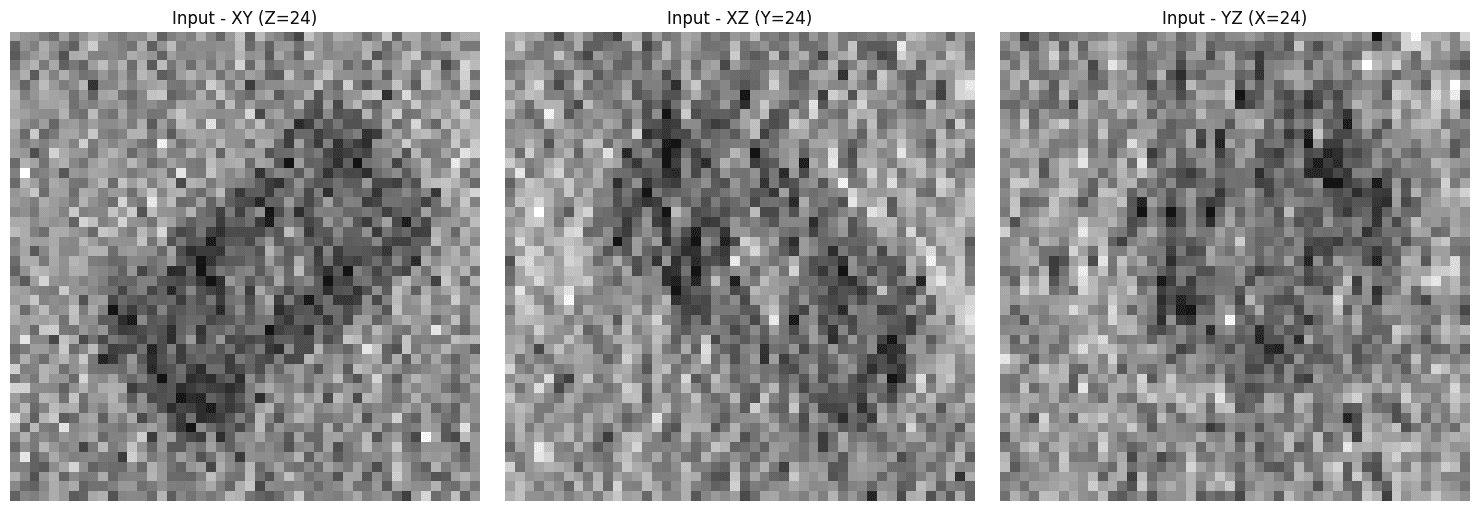
Output:

Displaying reconstruction orthoviews...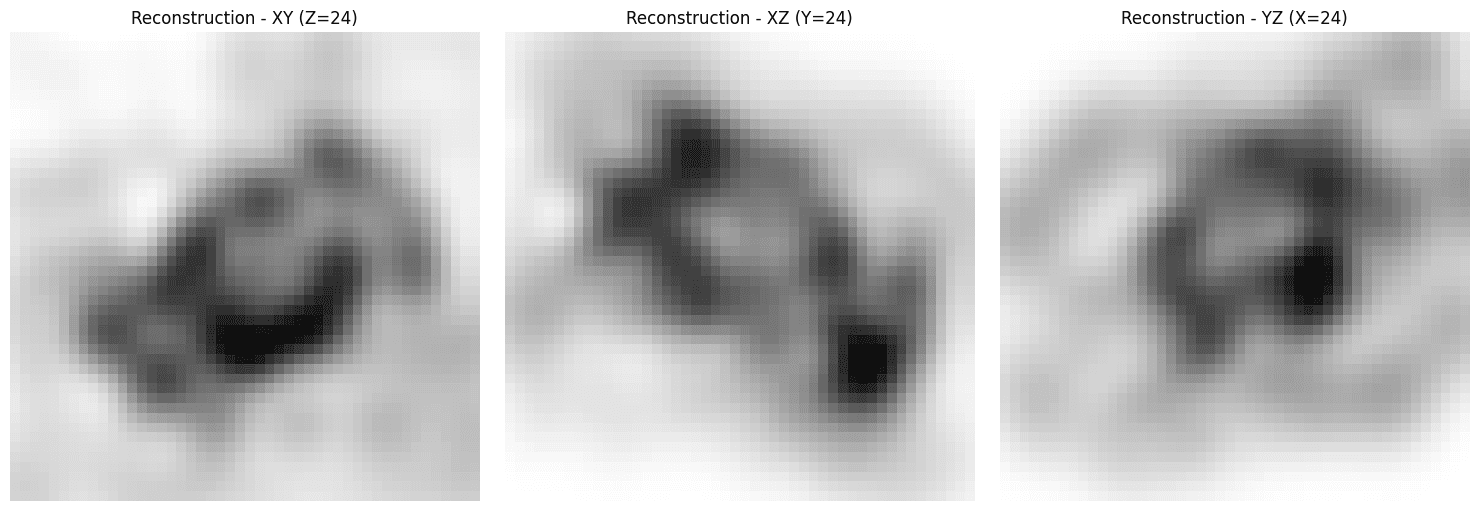
Output:

Latent embedding shape: (40,)
Demo complete!
Create interactive visualization
This next step expands on the previous cell by visualizing the output as a 3D volume rendering.
Spin the structure around to see the completeness of CryoLens 3D reconstructions on this data!
import numpy as np
import plotly.graph_objects as go
import matplotlib.pyplot as plt

def create_reconstruction_volume(reconstruction, opacity=0.1, invert_reconstruction=True):
    """
    Create a volume rendering visualization of just the reconstruction.

    Parameters
    ----------
    reconstruction : np.ndarray
        Reconstructed volume of shape (D, H, W)
    opacity : float
        Opacity for volume rendering
    invert_reconstruction : bool
        If True, inverts the reconstruction for better visualization
    """

    # Invert reconstruction if requested
    if invert_reconstruction:
        reconstruction_viz = -reconstruction
        print("Inverted reconstruction for volume rendering")
    else:
        reconstruction_viz = reconstruction

    # Create meshgrid
    X, Y, Z = np.mgrid[0:reconstruction.shape[0],
                        0:reconstruction.shape[1],
                        0:reconstruction.shape[2]]

    # Create figure
    fig = go.Figure()

    # Normalize volume
    recon_norm = (reconstruction_viz - reconstruction_viz.min()) / (reconstruction_viz.max() - reconstruction_viz.min())

    # Add reconstruction volume
    fig.add_trace(
        go.Volume(
            x=X.flatten(),
            y=Y.flatten(),
            z=Z.flatten(),
            value=recon_norm.flatten(),
            opacity=opacity,
            surface_count=21,
            colorscale='Reds',
            showscale=True,
            colorbar=dict(title="Intensity")
        )
    )

    # Update layout
    fig.update_layout(
        title_text="Reconstruction Volume Rendering (Inverted)",
        width=800,
        height=800,
        scene=dict(
            xaxis=dict(title='X'),
            yaxis=dict(title='Y'),
            zaxis=dict(title='Z'),
            aspectmode='cube'
        )
    )

    return fig

def create_matplotlib_slices(input_volume, reconstruction, invert_reconstruction=True):
    """
    Create slice viewer with matplotlib showing input, reconstruction, and difference.
    """

    # Invert reconstruction if requested
    if invert_reconstruction:
        reconstruction_viz = -reconstruction
        recon_label = "Reconstruction (Inverted)"
    else:
        reconstruction_viz = reconstruction
        recon_label = "Reconstruction"

    # Create figure with multiple views
    fig, axes = plt.subplots(3, 3, figsize=(15, 15))

    # Get center slices
    center_z = input_volume.shape[0] // 2
    center_y = input_volume.shape[1] // 2
    center_x = input_volume.shape[2] // 2

    # Row 1: XY slices (Z center)
    axes[0, 0].imshow(input_volume[center_z, :, :], cmap='gray')
    axes[0, 0].set_title(f'Input - XY (Z={center_z})')
    axes[0, 0].axis('off')

    axes[0, 1].imshow(reconstruction_viz[center_z, :, :], cmap='gray')
    axes[0, 1].set_title(f'{recon_label} - XY (Z={center_z})')
    axes[0, 1].axis('off')

    diff_xy = reconstruction_viz[center_z, :, :] - input_volume[center_z, :, :]
    im1 = axes[0, 2].imshow(diff_xy, cmap='RdBu_r', vmin=-np.abs(diff_xy).max(), vmax=np.abs(diff_xy).max())
    axes[0, 2].set_title('Difference - XY')
    axes[0, 2].axis('off')
    plt.colorbar(im1, ax=axes[0, 2], fraction=0.046)

    # Row 2: XZ slices (Y center)
    axes[1, 0].imshow(input_volume[:, center_y, :], cmap='gray')
    axes[1, 0].set_title(f'Input - XZ (Y={center_y})')
    axes[1, 0].axis('off')

    axes[1, 1].imshow(reconstruction_viz[:, center_y, :], cmap='gray')
    axes[1, 1].set_title(f'{recon_label} - XZ (Y={center_y})')
    axes[1, 1].axis('off')

    diff_xz = reconstruction_viz[:, center_y, :] - input_volume[:, center_y, :]
    im2 = axes[1, 2].imshow(diff_xz, cmap='RdBu_r', vmin=-np.abs(diff_xz).max(), vmax=np.abs(diff_xz).max())
    axes[1, 2].set_title('Difference - XZ')
    axes[1, 2].axis('off')
    plt.colorbar(im2, ax=axes[1, 2], fraction=0.046)

    # Row 3: YZ slices (X center)
    axes[2, 0].imshow(input_volume[:, :, center_x], cmap='gray')
    axes[2, 0].set_title(f'Input - YZ (X={center_x})')
    axes[2, 0].axis('off')

    axes[2, 1].imshow(reconstruction_viz[:, :, center_x], cmap='gray')
    axes[2, 1].set_title(f'{recon_label} - YZ (X={center_x})')
    axes[2, 1].axis('off')

    diff_yz = reconstruction_viz[:, :, center_x] - input_volume[:, :, center_x]
    im3 = axes[2, 2].imshow(diff_yz, cmap='RdBu_r', vmin=-np.abs(diff_yz).max(), vmax=np.abs(diff_yz).max())
    axes[2, 2].set_title('Difference - YZ')
    axes[2, 2].axis('off')
    plt.colorbar(im3, ax=axes[2, 2], fraction=0.046)

    plt.tight_layout()
    plt.show()

    return fig

# ============================================================================
# Main visualization - Streamlined version
# Note: input_volume and reconstruction should already be defined from previous cell
# ============================================================================

print("=== RECONSTRUCTION VOLUME RENDERING ===")
print("Creating volume rendering of reconstruction...")
try:
    fig_volume = create_reconstruction_volume(reconstruction,
                                               opacity=0.1,
                                               invert_reconstruction=True)
    fig_volume.show()
    print("✓ Volume rendering created. Rotate with mouse, zoom with scroll.")
except Exception as e:
print(f"Error with volume rendering: {e}")Output:
=== RECONSTRUCTION VOLUME RENDERING ===
Creating volume rendering of reconstruction...
Inverted reconstruction for volume rendering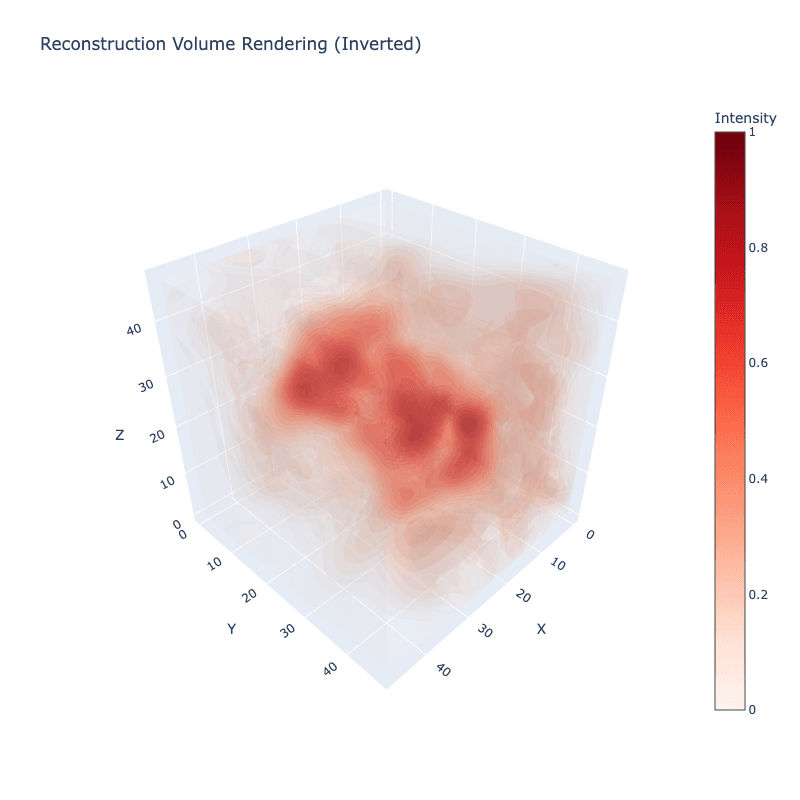
Output:

✓ Volume rendering created. Rotate with mouse, zoom with scroll.print("\n=== CENTER SLICE COMPARISONS ===")
fig_slices = create_matplotlib_slices(input_volume, reconstruction, invert_reconstruction=True)
print("\n" + "="*70)
print("VISUALIZATIONS COMPLETE!")
print("="*70)
print(f"\nStructure: {STRUCTURE}")
print("You now have:")
print(" 1. 3D Volume Rendering (reconstruction only)")
print(" 2. 2D Slice Comparisons (input vs reconstruction with differences)")
print("\nReconstruction is inverted for better visualization.")Output:
=== CENTER SLICE COMPARISONS ===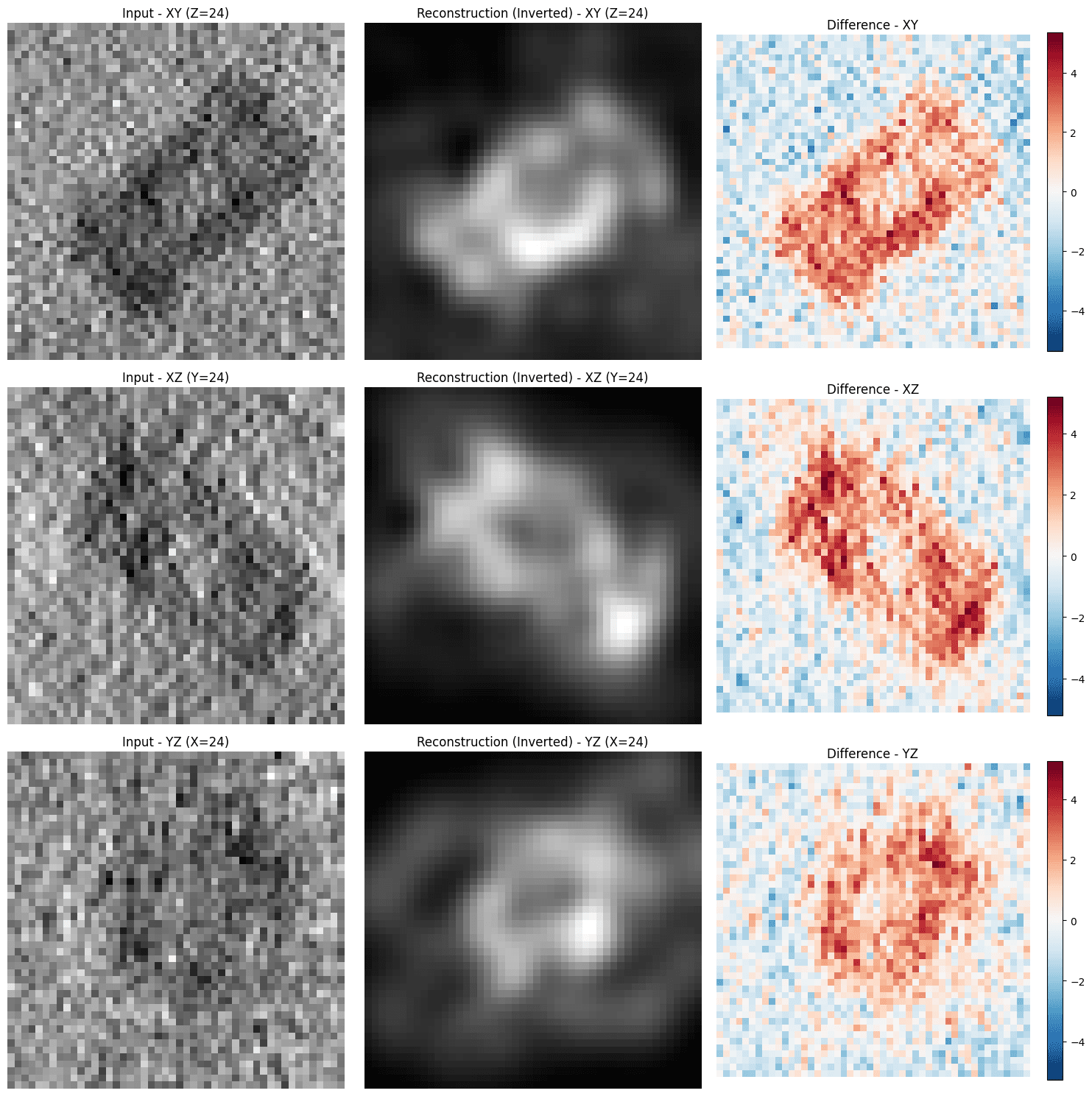
Output:

======================================================================
VISUALIZATIONS COMPLETE!
======================================================================

Structure: 1g3i
You now have:
  1. 3D Volume Rendering (reconstruction only)
  2. 2D Slice Comparisons (input vs reconstruction with differences)

Reconstruction is inverted for better visualization.
Particle picking quality assessment
Follow the Try CryoLens instructions to select some candidate particles for quality assessment and download it locally.
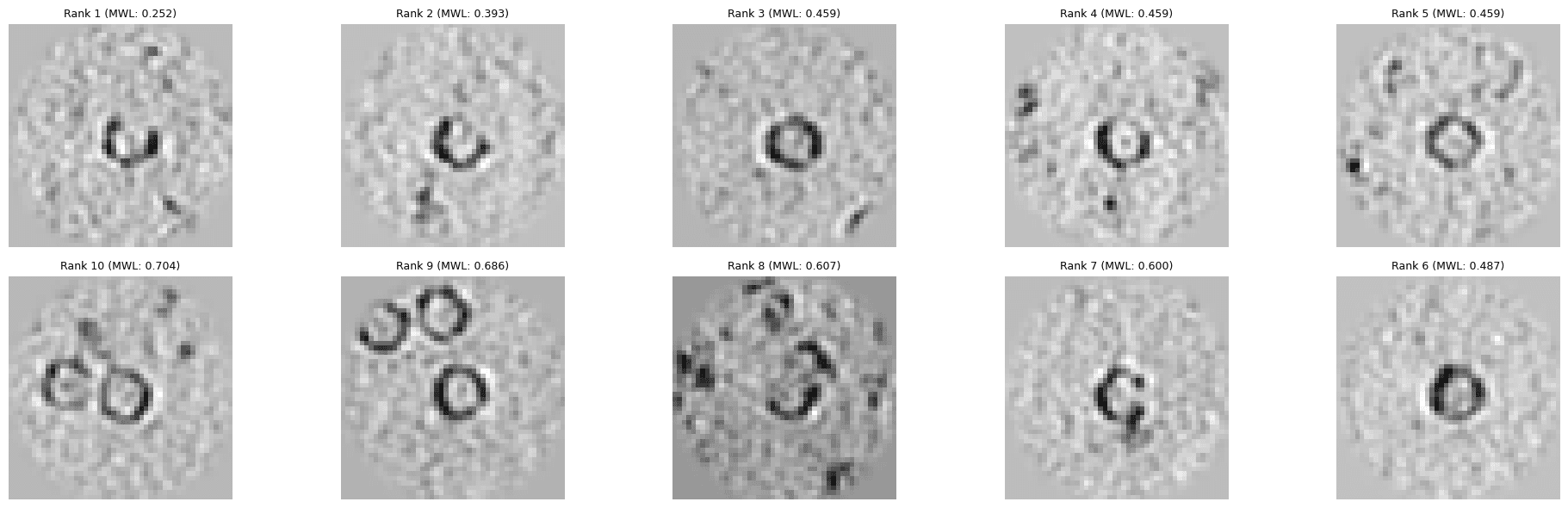
The quality assessment leverages CryoLens' ability to reconstruct and combine multiple structures, where all candidate particles are reconstructed and combined into a single average reconstruction. The particle quality assessment then measures the error between each candidate particle's reconstruction and the averaged reconstruction.
When you run the following cell it will prompt you to upload the file you exported in the Try CryoLens instructions.
# %%
import json
import io
import numpy as np
import torch
import matplotlib.pyplot as plt
import pandas as pd
from pathlib import Path
from tqdm import tqdm
import copick
import zarr

from cryolens.utils.checkpoint_loading import load_vae_model
from cryolens.inference.pipeline import InferencePipeline
from cryolens.data.copick import extract_particles_from_tomogram
from cryolens.training.losses import MissingWedgeLoss
from cryolens.evaluation.ood_reconstruction import generate_resampled_reconstructions, align_volume, normalize_volume_zscore
from cryolens.evaluation.fsc import apply_soft_mask

# Upload NDJSON file
from google.colab import files
print("Please upload your NDJSON file with particle coordinates:")
uploaded = files.upload()

# Get the uploaded file
ndjson_filename = list(uploaded.keys())[0]
ndjson_content = uploaded[ndjson_filename].decode('utf-8')
print(f"Uploaded: {ndjson_filename}")

# Parse NDJSON
coordinates = [json.loads(line) for line in ndjson_content.strip().split('\n') if line.strip()]
target_run_name = coordinates[0]['run_name']
print(f"Processing {len(coordinates)} particles from {target_run_name}")

# Config
CHECKPOINT_PATH = "v001"
COPICK_CONFIG = Path("/mnt/czi-sci-ai/imaging-models/data/cryolens/mlc/copick_czcdp/ml_challenge_experimental_only.json")
OUTPUT_DIR = Path("./quality_ranking_results")
VOXEL_SIZE = 10.0
BOX_SIZE = 48
OUTPUT_DIR.mkdir(parents=True, exist_ok=True)

# root = copick.from_file(str(COPICK_CONFIG))
root = copick.from_czcdp_datasets([10440, 10445, 10446], overlay_root="./overlay")
matching_run = next(r for r in root.runs if r.meta.portal_run_name == target_run_name)
best_vs = min(matching_run.voxel_spacings, key=lambda vs: abs(vs.voxel_size - VOXEL_SIZE))
tomogram = next((t for t in best_vs.tomograms if hasattr(t, 'tomo_type') and t.tomo_type == 'denoised'), list(best_vs.tomograms)[0])
tomo_zarr = zarr.open(tomogram.zarr(), mode='r')
tomogram_data = np.array(tomo_zarr.get('0', tomo_zarr.get('s0', tomo_zarr.get('data', tomo_zarr[list(tomo_zarr.keys())[0]]))))

# Filter positions that are within valid bounds
half_box = BOX_SIZE // 2
positions = []
valid_coords = []
for coord in coordinates:
    loc = coord['location']
    pos = (loc['x'], loc['y'], loc['z'])
    # Convert to voxel coordinates to check bounds
    voxel_pos = np.array(pos) / best_vs.voxel_size
    if (voxel_pos[2] >= half_box and voxel_pos[2] < tomogram_data.shape[0] - half_box and
        voxel_pos[1] >= half_box and voxel_pos[1] < tomogram_data.shape[1] - half_box and
        voxel_pos[0] >= half_box and voxel_pos[0] < tomogram_data.shape[2] - half_box):
        positions.append(pos)
        valid_coords.append(coord)

particles = np.array(extract_particles_from_tomogram(tomogram_data, positions, best_vs.voxel_size, BOX_SIZE, normalize=True))

# Load model and generate reconstructions
device = torch.device("cuda" if torch.cuda.is_available() else "cpu")
model, config = load_vae_model(CHECKPOINT_PATH, device=device, load_config=True, strict_loading=False)
model.eval()
pipeline = InferencePipeline(model=model, device=device, normalization_method=config.get('normalization', 'z-score'))

masked_particles = [apply_soft_mask(p, radius=22, soft_edge=5) for p in particles]
all_reconstructions = []
reference_reconstruction = None
for idx, particle in enumerate(tqdm(masked_particles, desc="Reconstructing")):
    recon_norm = normalize_volume_zscore(generate_resampled_reconstructions(
        particle, model, pipeline, device, n_samples=1, noise_level=0.0, target_shape=(BOX_SIZE, BOX_SIZE, BOX_SIZE)
    )[0])
    if idx == 0:
        reference_reconstruction = recon_norm
        all_reconstructions.append(recon_norm)
    else:
        all_reconstructions.append(align_volume(reference_reconstruction, recon_norm, n_angles=24, refine=True)[0])

# Compute MWL distances
average_reconstruction = np.mean(all_reconstructions, axis=0)
mwl_loss = MissingWedgeLoss(volume_size=BOX_SIZE, wedge_angle=90.0, weight_factor=0.3).to(device)
avg_tensor = torch.from_numpy(average_reconstruction).float().unsqueeze(0).unsqueeze(0).to(device)
mwl_distances = []
for recon in all_reconstructions:
    with torch.no_grad():
        mwl_distances.append(mwl_loss(torch.from_numpy(recon).float().unsqueeze(0).unsqueeze(0).to(device), avg_tensor).item())

# Create rankings
df_quality = pd.DataFrame([{
    'rank': 0,
    'particle_idx': i,
    'x': valid_coords[i]['location']['x'],
    'y': valid_coords[i]['location']['y'],
    'z': valid_coords[i]['location']['z'],
    'mwl_score': mwl_distances[i]
} for i in range(len(valid_coords))])
df_quality['rank'] = df_quality['mwl_score'].rank(method='min').astype(int)
df_quality = df_quality.sort_values('mwl_score').reset_index(drop=True)

# Display table
print("\n" + "="*70)
print(df_quality[['rank', 'particle_idx', 'x', 'y', 'z', 'mwl_score']].to_string(index=False))
print("="*70)

# Plot best vs worst (input only)
n = min(5, len(df_quality))
fig, axes = plt.subplots(2, n, figsize=(4*n, 6))
if n == 1:
    axes = axes.reshape(2, 1)

for i in range(n):
    # Best particles (top row)
    idx = int(df_quality.iloc[i]['particle_idx'])
    rank = int(df_quality.iloc[i]['rank'])
    score = df_quality.iloc[i]['mwl_score']

    axes[0, i].imshow(masked_particles[idx][BOX_SIZE//2, :, :], cmap='gray')
    axes[0, i].set_title(f"Rank {rank} (MWL: {score:.3f})", fontsize=9)
    axes[0, i].axis('off')

    # Worst particles (bottom row)
    idx = int(df_quality.iloc[-(i+1)]['particle_idx'])
    rank = int(df_quality.iloc[-(i+1)]['rank'])
    score = df_quality.iloc[-(i+1)]['mwl_score']

    axes[1, i].imshow(masked_particles[idx][BOX_SIZE//2, :, :], cmap='gray')
    axes[1, i].set_title(f"Rank {rank} (MWL: {score:.3f})", fontsize=9)
    axes[1, i].axis('off')

axes[0, 0].set_ylabel('Best', fontsize=11, fontweight='bold')
axes[1, 0].set_ylabel('Worst', fontsize=11, fontweight='bold')
plt.tight_layout()
plt.savefig(OUTPUT_DIR / f"{target_run_name}_quality.png", dpi=150, bbox_inches='tight')
plt.show()Output:
Please upload your NDJSON file with particle coordinates:
Saving similar-particles-TS_101_5-1762194886566.ndjson to similar-particles-TS_101_5-1762194886566.ndjson
Uploaded: similar-particles-TS_101_5-1762194886566.ndjson
Processing 10 particles from TS_101_5
Using version 'v001': CryoLens v0.1 production model ]8;id=472685;file:///usr/local/lib/python3.12/dist-packages/cryolens/utils/checkpoint_loading.py\checkpoint_loading.py]8;;\:]8;id=128729;file:///usr/local/lib/python3.12/dist-packages/cryolens/utils/checkpoint_loading.py#114\114]8;;\
Downloading file 'cryolens_v001.pt' from 'https://czi-cryolens.s3-us-west-2.amazonaws.com/weights/cryolens_v001.pt' to '/root/.cache/cryolens'.
Cached at: /root/.cache/cryolens/cryolens_v001.pt ]8;id=765084;file:///usr/local/lib/python3.12/dist-packages/cryolens/utils/checkpoint_loading.py\checkpoint_loading.py]8;;\:]8;id=627611;file:///usr/local/lib/python3.12/dist-packages/cryolens/utils/checkpoint_loading.py#127\127]8;;\
Removing 1 coordinate/renderer buffers for compatibility ]8;id=545629;file:///usr/local/lib/python3.12/dist-packages/cryolens/utils/checkpoint_loading.py\checkpoint_loading.py]8;;\:]8;id=56428;file:///usr/local/lib/python3.12/dist-packages/cryolens/utils/checkpoint_loading.py#553\553]8;;\
Using training params from registry for version v001 ]8;id=891642;file:///usr/local/lib/python3.12/dist-packages/cryolens/utils/checkpoint_loading.py\checkpoint_loading.py]8;;\:]8;id=845659;file:///usr/local/lib/python3.12/dist-packages/cryolens/utils/checkpoint_loading.py#579\579]8;;\
Inferred from checkpoint: num_splats=1536, latent_ratio=0.799 ]8;id=292784;file:///usr/local/lib/python3.12/dist-packages/cryolens/utils/checkpoint_loading.py\checkpoint_loading.py]8;;\:]8;id=527291;file:///usr/local/lib/python3.12/dist-packages/cryolens/utils/checkpoint_loading.py#416\416]8;;\
Model loaded successfully from /root/.cache/cryolens/cryolens_v001.pt ]8;id=627895;file:///usr/local/lib/python3.12/dist-packages/cryolens/utils/checkpoint_loading.py\checkpoint_loading.py]8;;\:]8;id=363975;file:///usr/local/lib/python3.12/dist-packages/cryolens/utils/checkpoint_loading.py#670\670]8;;\
Reconstructing: 100%|██████████| 10/10 [00:20<00:00, 2.09s/it]
MissingWedgeLoss initialized with: volume_size=48, wedge_angle=90.0, weight_factor=0.3
======================================================================
rank particle_idx x y z mwl_score
1 0 3150.3780 4080.4896 1310.1572 0.251938
2 1 2880.3456 4030.4836 1040.1248 0.392816
3 2 3440.4128 4380.5256 1290.1548 0.458864
4 7 4000.4800 4590.5508 1230.1476 0.458901
5 8 3890.4668 2700.3240 1070.1284 0.459205
6 3 3440.4128 4400.5280 1150.1380 0.486572
7 5 2100.2520 2420.2904 1220.1464 0.600331
8 4 3760.4512 1850.2220 1030.1236 0.607155
9 6 2880.3456 2910.3492 1230.1476 0.685714
10 9 1280.1536 4210.5052 1540.1848 0.703598
======================================================================
Model Outputs
After completing this quickstart you will have:
- 3D reconstruction of a selected sample from the CryoLens validation data set
- 2D slice comparisons of that sample
- Interactive 3D volume rendering of the reconstructed sample
- Quality assessment of an uploaded sample using Try CryoLens demo
Contact and Acknowledgments
For issues with this tutorial please contact kharrington@chanzuckerberg.com
Responsible Use
We are committed to advancing the responsible development and use of artificial intelligence. Please follow our Acceptable Use Policy when engaging with our services.
Should you have any security or privacy issues or questions related to the services, please reach out to our team at security@chanzuckerberg.com or privacy@chanzuckerberg.com respectively.